














Collingwood Smart RF Wall Control Plate for Collingwood Colour Change Lights - White

Pay in 3 with Klarna
Rated five stars by thousands of customers since 2014 - see our full review history here

5 Years Warranty

Hassle-Free Returns

20+ Years of Experience

Free UK Delivery*
Colour control that lives on the wall
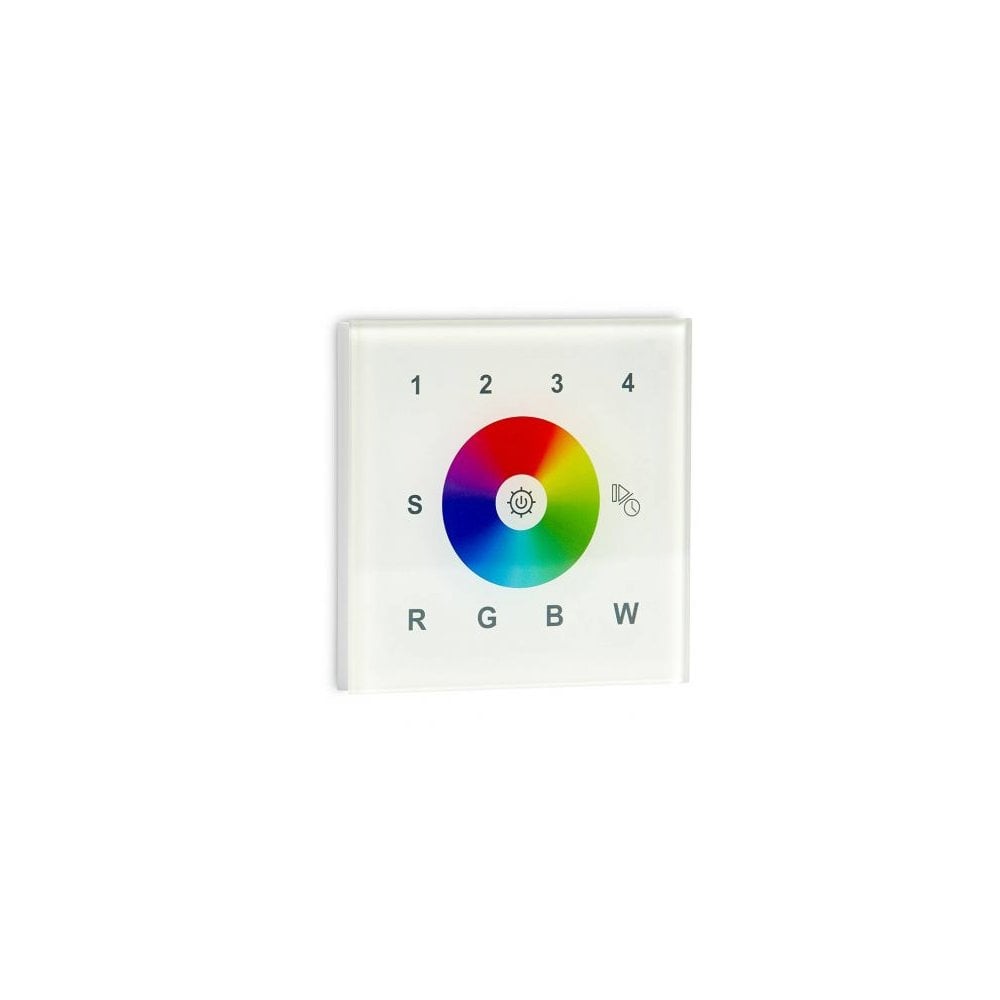
This is Collingwood's touch sensitive glass wall plate for their colour change lighting, product code CCWALLRFW. Everything sits on one square panel: a full colour wheel you sweep with a finger, four zone keys across the top, and separate R, G, B and W keys along the bottom for the individual channels. It speaks to the fittings by radio rather than through a wire, so no signal cable has to be chased back from the plate to the lights. That is the real appeal of an RGBW wall controller like this one. You get a proper switch on the wall for a colour changing circuit, and guests can use it without being handed a phone.
The white glass version
The front is a single pane of white glass with a clear bevelled edge that picks up a little light where the plate meets the wall. The lettering and icons are printed in a soft grey instead of black, so when nobody is touching it the panel stays quiet and the colour wheel is the only thing that stands out. On white or off white plaster it almost vanishes. It sits comfortably beside white moulded switch plates and white sockets, which makes it the sensible pick when the control should blend into the wall rather than announce itself. Collingwood lists the same plate in black if the wall behind it is dark.
How It Works
The plate is a transmitter, not a driver. It sends a radio signal on 869.5 and 434MHz to Collingwood's universal series RF receivers, and those receivers do the actual switching and dimming of the lights. Pairing is done from the receiver: put it into learning mode using its learning key, or by powering it up three times in a row, then tap a zone number on the plate and touch the colour wheel. The lights flash once to confirm they have joined that zone.
- Tap a zone key from 1 to 4 to select it, or hold the key to switch that zone on or off. The button in the middle of the colour wheel turns every zone on or off at once.
- Select a zone, then press and hold, to raise or lower the brightness of that zone on its own.
- Tap R, G, B or W to switch that channel off and on. Hold one to trim just that channel's intensity, which is how you warm or cool a mix.
- The S key stores and recalls scenes. Hold it to save the current look, then tap a number from 1 to 4. Four scenes can be kept for each zone.
- The play and pause icon runs 10 built in colour changing effects. Hold it to speed them up or slow them down.
- Supplied as the control plate alone. It needs a supply behind it and at least one paired RF receiver to do anything.
Where It Works Best
It mounts like a light switch, on a standard single back box at switch height, usually just inside the door of whichever space the colour change lighting serves. Media walls, coving and cove runs, under cabinet strips, bar and games room lighting, and garden circuits that are driven from a receiver indoors are all typical jobs. The four zones are what make it worth fitting: front garden on one, borders on another, deck and pergola on the last two, all reachable from one plate in the hall or utility. It also earns its place anywhere a phone app is a nuisance, such as a holiday let, a reception area, or a family home where not everyone wants to hunt for an app to turn the lights blue. Being IP20 it is strictly for dry indoor positions, so it should not go on an exposed exterior wall even when the lights it controls are outside.
About Collingwood Lighting
Collingwood designs and builds its LED products at Sywell in Northamptonshire, and has worked in LED specifically since 2002, which is a long run in a field that has changed as fast as this one. The brand states it was among the first to put fire rated, fully sealed for life and mains dimmable LED products in front of the UK electrical wholesale trade. It also holds an EcoVadis Gold medal, which places it in the top 5% of all companies assessed worldwide for sustainability.
Good to Know
- Covered by a 5 year Collingwood warranty.
- Rated IP20. That means it is protected against fingers and larger solid objects but has no protection from water, so it belongs in a dry indoor location only and must not be fitted in a bathroom zone.
- Measures 86mm x 86mm x 30.5mm and fits a standard UK single back box, with 60.3mm fixing centres.
- Draws around 20mA, and is rated for use between 0 and 40 degrees C with relative humidity from 8% to 80%.
- Controls RGBW colour across four zones, either all together or one at a time.
- Compatible with Collingwood's universal series RF receivers. It is not a driver and will not power a fitting on its own, and it will not control a plain white light that has no RF receiver behind it.
- Do not apply power while installing it, and keep it away from damp during and after fitting.
- Clean the glass with a dry or barely damp soft cloth. No solvents, no abrasive creams.
- Moonlight Design recommends installation by a registered NICEIC electrician.
Questions People Ask
How many zones can the Collingwood CCWALLRFW wall control plate handle?
The Collingwood CCWALLRFW plate controls four zones. The numbered keys 1 to 4 let you drive each zone separately, and the button at the centre of the colour wheel commands all four at the same time.
Does this wall plate need a signal cable running to the lights?
No. The Collingwood smart RF wall control plate sends its commands wirelessly on 869.5 and 434MHz to a paired RF receiver, so only the receiver needs to sit near the lights and no control cable has to be chased between the plate and the fittings.
How do you pair the plate with a Collingwood RF receiver?
Put the RF receiver into pairing mode by pressing its learning key or by switching it off and on three times in quick succession, tap a zone number on the wall plate, then touch the colour wheel. The connected lights flash once to confirm that zone is paired.
Can colour scenes be saved on this control plate?
Yes. Four scenes can be stored for each zone. Set the colour you want, hold the S key until the indicator flashes, then tap a number from 1 to 4 to save it in that slot, and recall it later by tapping S followed by the same number.
Is the Collingwood smart RF wall control plate suitable for a bathroom?
No. This control plate is rated IP20, which offers no protection against water at all, so it must be installed in a dry indoor location and never inside a bathroom or shower room zone.
We offer free standard delivery on orders within the UK Mainland* (an additional fee applies for the Isle of Wight, the Isle of Man, the Scottish Isles, parts of Scotland, Northern Ireland, the Republic of Ireland, the Channel Isles and International).
*Collingwood orders under £150 incur a delivery fee of £9.95 inc. VAT.
*Any order under £49 incurs a delivery fee of £9.95.
Specifications
What Our Customers Say About Us